New to AI? Start here → Start 1. ChatGPT vs. Codex: what's the difference?
Upload files and images to ChatGPT
In one line
Share files and images, then review them together
Instead of retyping long explanations, share the material and what to check.
The big picture
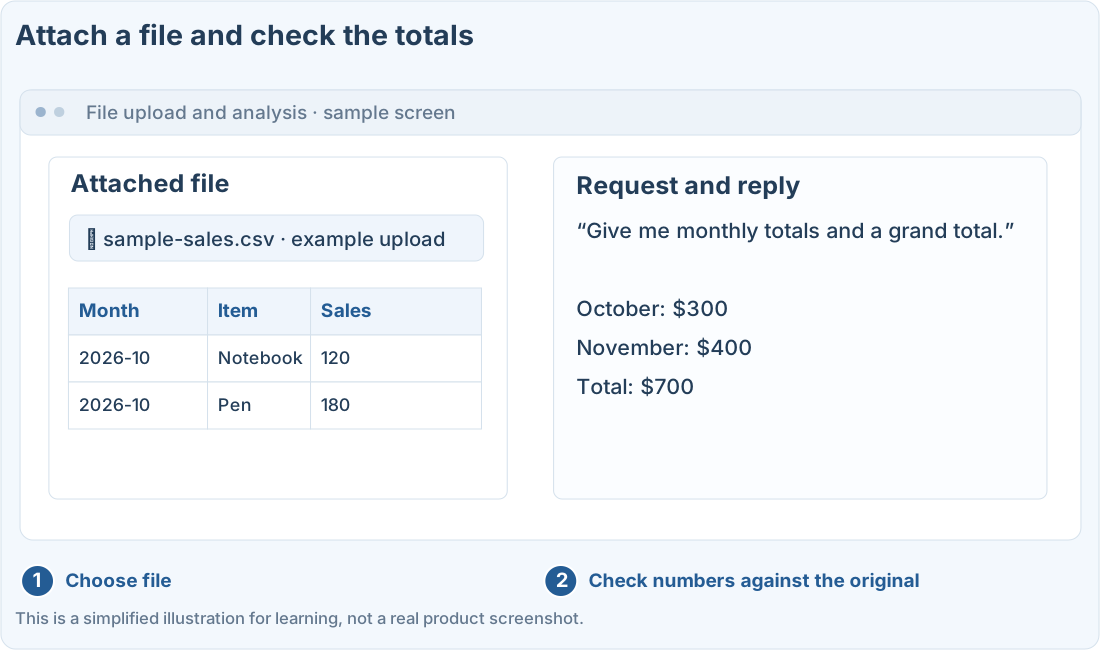
Illustration (may look a little different from the real screen)
Follow along
Use practice material, not the real thing
When you attach documents, spreadsheets, or images, you can ask it to summarize or compare them. Features and limits can vary by plan, account, model, and setup.
A ChatGPT setup that supports file uploads, and practice material with no sensitive information. This site doesn’t upload or analyze files itself.
You can download the made-up sales CSV below to practice. It’s an example for spreadsheet analysis, not real sales data.
Download the sample sales CSVAttach it, then say what you want done
- Use the attach option in ChatGPT’s message box to choose a file or image.
- Make sure it finished attaching.
- Ask for what to look at and what shape you want the result in.
- Compare the numbers and sentences in the answer against the original.
Menu names and locations vary by setup. If a file type isn’t supported, check the formats in the official help pages, and consider copying the part you need as text.
Illustration (may look a little different from the real screen)
Add up the monthly sales in the attached CSV and tell me which columns you used.
Sample replyColumns used: Month, Sales
2026-10 total: $300
2026-11 total: $400
Grand total: $700
Add up the monthly sales in the attached CSV and tell me which columns you used.
Sample replyColumns used: Month, Sales
2026-10 total: $300
2026-11 total: $400
Grand total: $700
In tables, check units and totals
In this example, October sales are $120 and $180, and November sales are $150 and $250. So the monthly totals are $300 and $400, and the grand total is $700.
In real data, blank cells, duplicate rows, date formats, and currency can all affect the result. Ask it to check the column layout and missing values first.
Make images easy to read
Zoom in on small text, and mark the area you need. The AI can misread blurry numbers or cut-off sentences. Ask it to flag anything it can’t read instead of guessing.
Compare the numbers in a table, the axes of a chart, and the conditions in a document yourself. Don’t assume it read everything correctly just because the file or image was attached.
Prompts you can copy
Change the parts in square brackets to fit your situation, then paste it into ChatGPT or Codex.
Analyze the practice CSV
Check the text and numbers in an image
Where people get stuck
Quick check: How should I use numbers the AI read from a blurry image?
Answer: “Compare them with the original and recheck anything unclear”
Compare them with the original. Blurry or small text can be misread, so it’s best to check again with a clearer copy.
Official sources
I'm stuck here
Stuck while following along? Tell me where. Only the site owner sees this. Leave your email only if you'd like a reply.
💌 Get new tips by email
I'll email you when a new tip goes up. No ads, ever.