New to AI? Start here → Start 1. ChatGPT vs. Codex: what's the difference?
Send your first request, then refine it
In one line
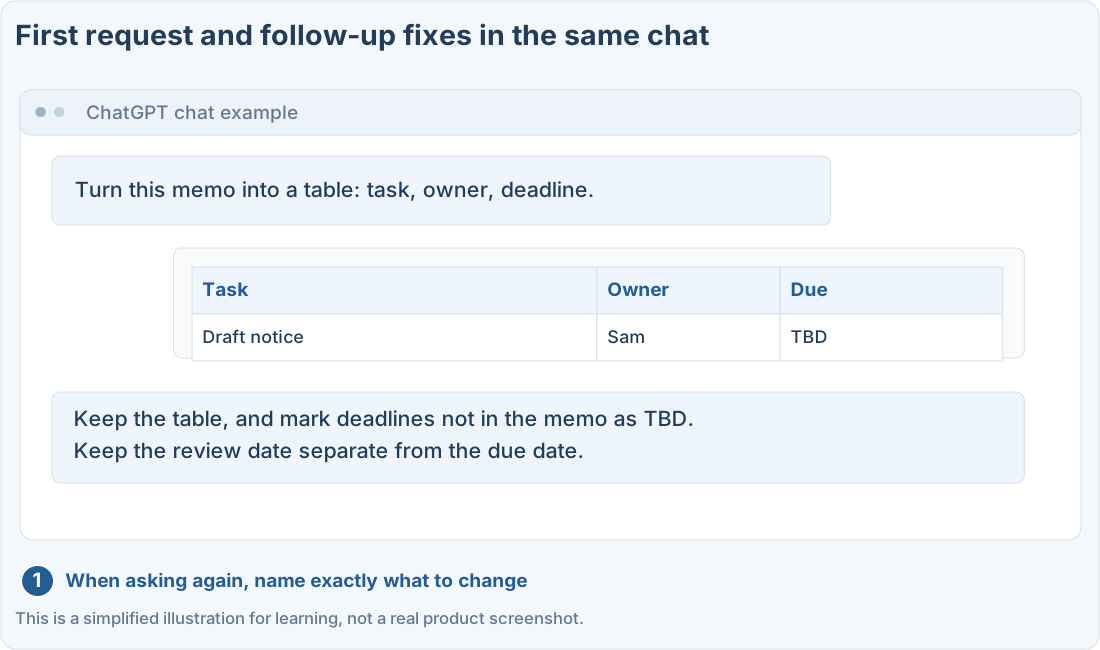
Keep the first request short, and the follow-ups specific
Instead of one perfect sentence, have a conversation while you look at the results.
The big picture
Illustration (may look a little different from the real screen)
Follow along
Pick one small result
“Organize these meeting notes into a to-do table” is easier to start with than “Automate all my work.” When the result is small, it’s also easy to check whether it came out the way you wanted.
ChatGPT, or a Codex setup you can use. The text examples in this guide don’t need file uploads or a paid API.
Give ChatGPT the material and the result you want
Below is a made-up meeting memo. Ask the AI not to invent owners or deadlines that aren’t there.
Need a notice for next week’s event. Sam drafts it. Review on Thursday. No one assigned to photos yet.
Illustration (may look a little different from the real screen)
Turn this memo into a table of task, owner, and deadline. Write TBD for anything that's missing.
Sample replyTask: Draft the notice
Owner: Sam
Deadline: TBD
Other date: Review on Thursday
Photos: TBD
Turn this memo into a table of task, owner, and deadline. Write TBD for anything that's missing.
Sample replyTask: Draft the notice
Owner: Sam
Deadline: TBD
Other date: Review on Thursday
Photos: TBD
Check that it didn’t turn “review on Thursday” into “draft due Thursday.” Meanings that weren’t in the original can sneak in.
If you don’t like it, point to what should change
Instead of “Do it again,” try “Cut it down to just the tasks in 3 lines, and put items with no owner at the end.” It helps to say what to keep and what to change.
★ Compare them ★
Vague follow-up
Organize it better.
Specific follow-up
Keep the table, and change any deadline that isn't in the original to TBD.
With Codex, narrow down what you want changed
When changing a project, say which file or screen to change and what to change. It’s easier to follow if you first ask for the current state and a plan, then check the changed result.
Ask for the changed files, how to run it, and what it checked. Even if the AI says “Done,” check that it actually works on the real screen.
Prompts you can copy
Change the parts in square brackets to fit your situation, then paste it into ChatGPT or Codex.
Organize a made-up meeting memo
Ask Codex for a change
Where people get stuck
Quick check: The AI wrote a deadline that wasn’t in the original. What’s a good follow-up?
Answer: “Ask it to change any deadline not in the original to TBD”
Change deadlines that aren’t in the original to TBD, and check whether guesses crept into other items too.
Official sources
I'm stuck here
Stuck while following along? Tell me where. Only the site owner sees this. Leave your email only if you'd like a reply.
💌 Get new tips by email
I'll email you when a new tip goes up. No ads, ever.